For wine & liquor stores

The operating system
for the bottle shop.

One calm system for checkout, inventory, invoices, and ordering — with a store assistant and real people on call 24/7. Built for owners, not IT departments.

Setup done for you · Your data stays yours
app.poscork.com
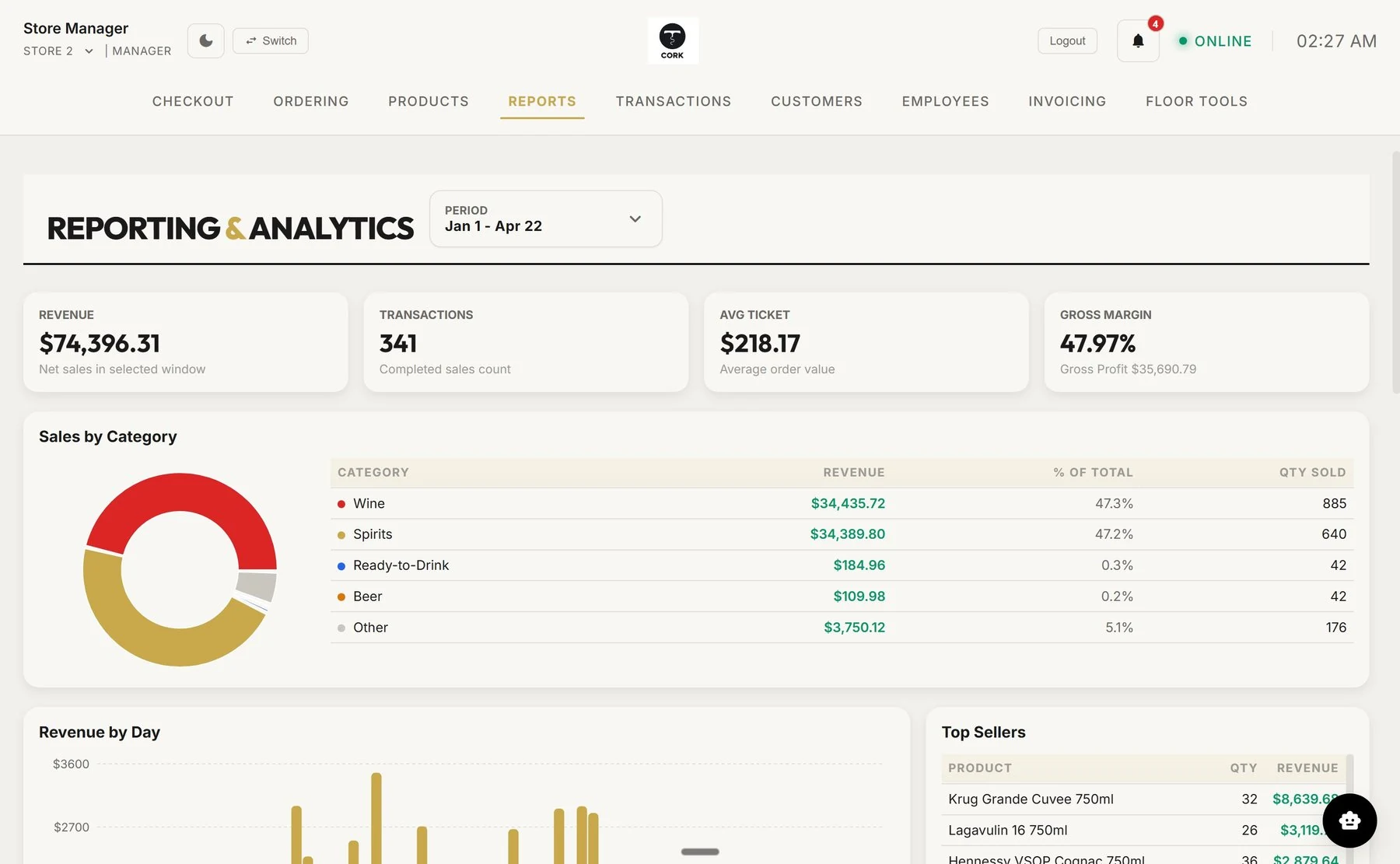
Cork Reports — revenue, transactions, average ticket, gross margin, and sales by category in one screen
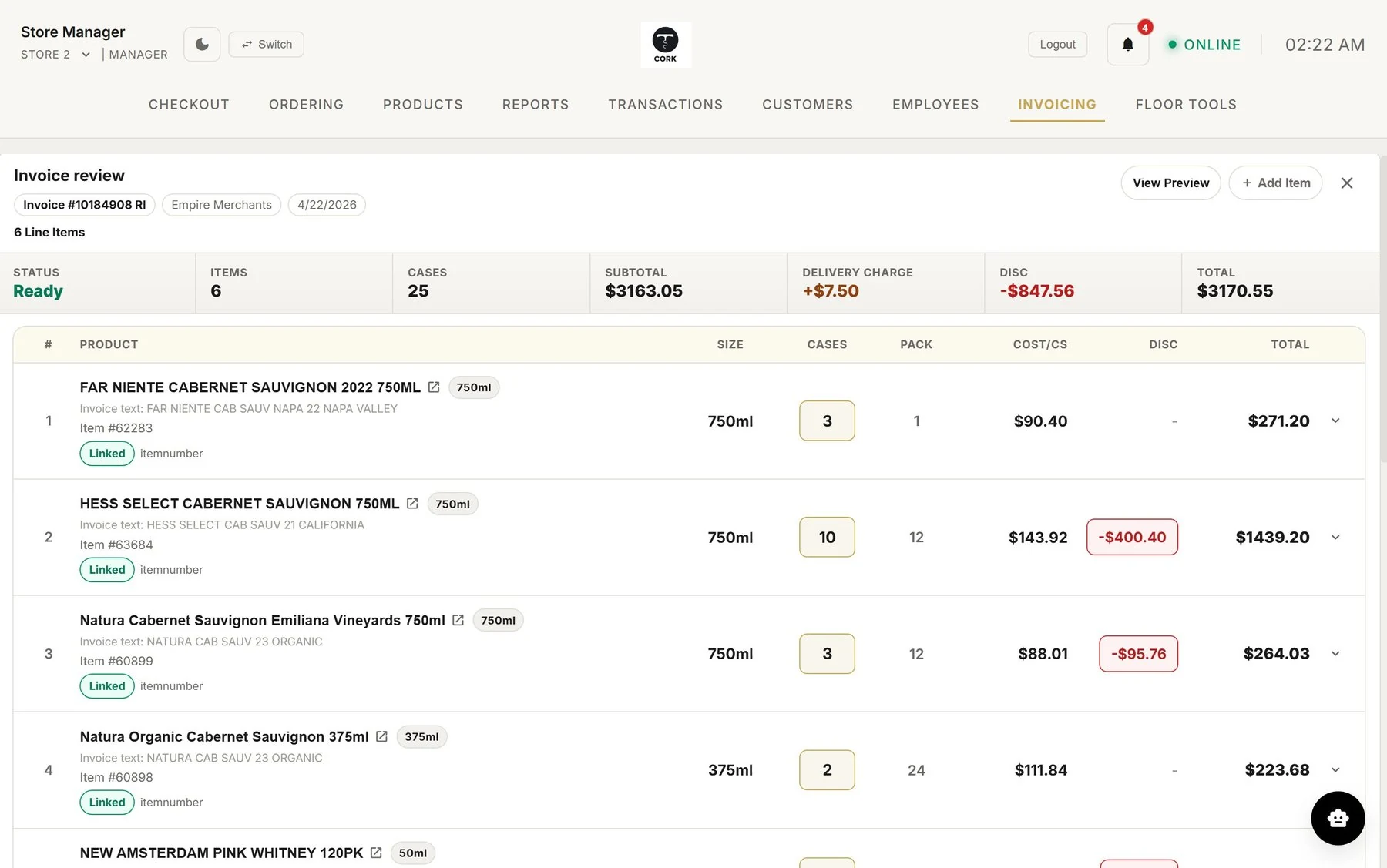
Cork Invoicing — a distributor invoice read line by line with items, cases, costs, and discounts
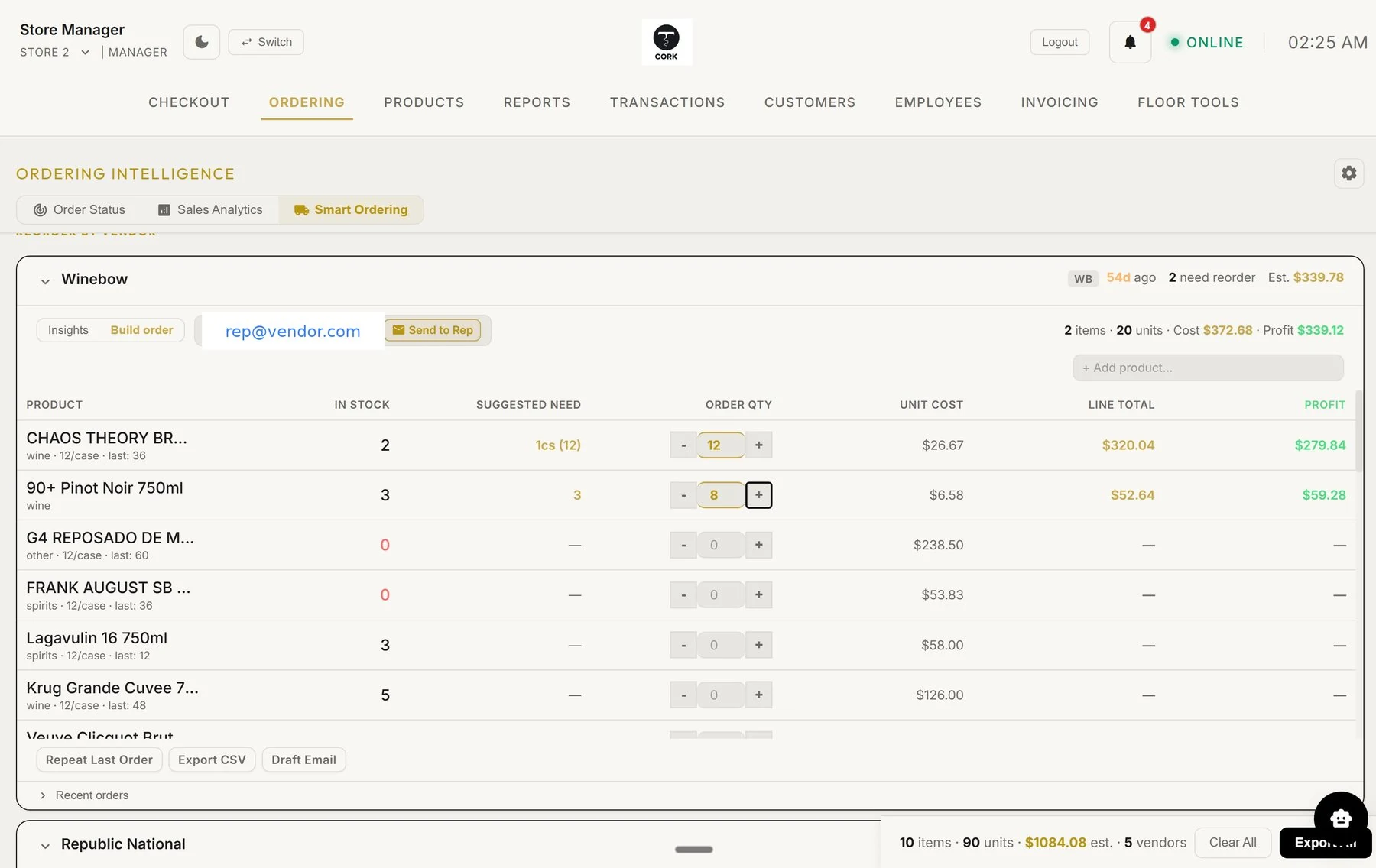
Cork Smart Ordering — reorder suggestions grouped by vendor with one-click email to your rep
4 steps
Upload, match, review, receive
11,970
SKUs in the catalog shown above
1 system
Replaces POS + spreadsheets + portals
24/7
A real person picks up
A considered switch

Bring your data with you.

Start with an export from your current POS. We review your catalog, stock, and available history with you, map the fields, and check the results before you switch.

Export-based setup, subject to review of your files. Supported data varies by vendor; these names do not indicate a live connection or certified integration. Setup is done for you.

All product names are trademarks of their respective owners. Cork is not affiliated with or endorsed by these companies.

The Problem

If you're still typing invoices
by hand, you're already behind.

A liquor store runs on thousands of bottles, a dozen distributors, paper invoices on the counter, and lines that don't wait. Old software makes you work around it. Cork makes the work disappear.

An evening spent keying invoices
Snap a photo. Review the lines. Receive.
Guessing the next reorder
Cork already counted. You just approve.
Software with no one to call
A real person, any hour, every day.
The Operating System

One system. Every part of the store.

No more bouncing between the register, spreadsheets, distributor portals, and email. Cork runs the whole loop.

Invoice Intelligence

Photograph any distributor invoice. Cork reads every line — items, cases, costs, discounts — and stages it for one-tap receiving.

Invoice review screen

Smart Ordering

Cork watches what's selling and drafts the reorder per vendor. Review it, tap send, and the PO lands in your rep's inbox.

Smart ordering screen

Fast Checkout

Scan, tap, charge. Big buttons that don't freeze on a Friday night.

Reports You Can Read

Revenue, margin, top sellers — on one screen, in plain numbers.

Always on

Store Assistant

Ask "what should I reorder?" and get an answer from your own shelves.

Product Preview

See the store workflow in motion.

A quick look at how Cork keeps checkout, inventory, invoicing, and ordering moving in one clean flow.

Smart Ordering

Suggested orders, sent in a single click.

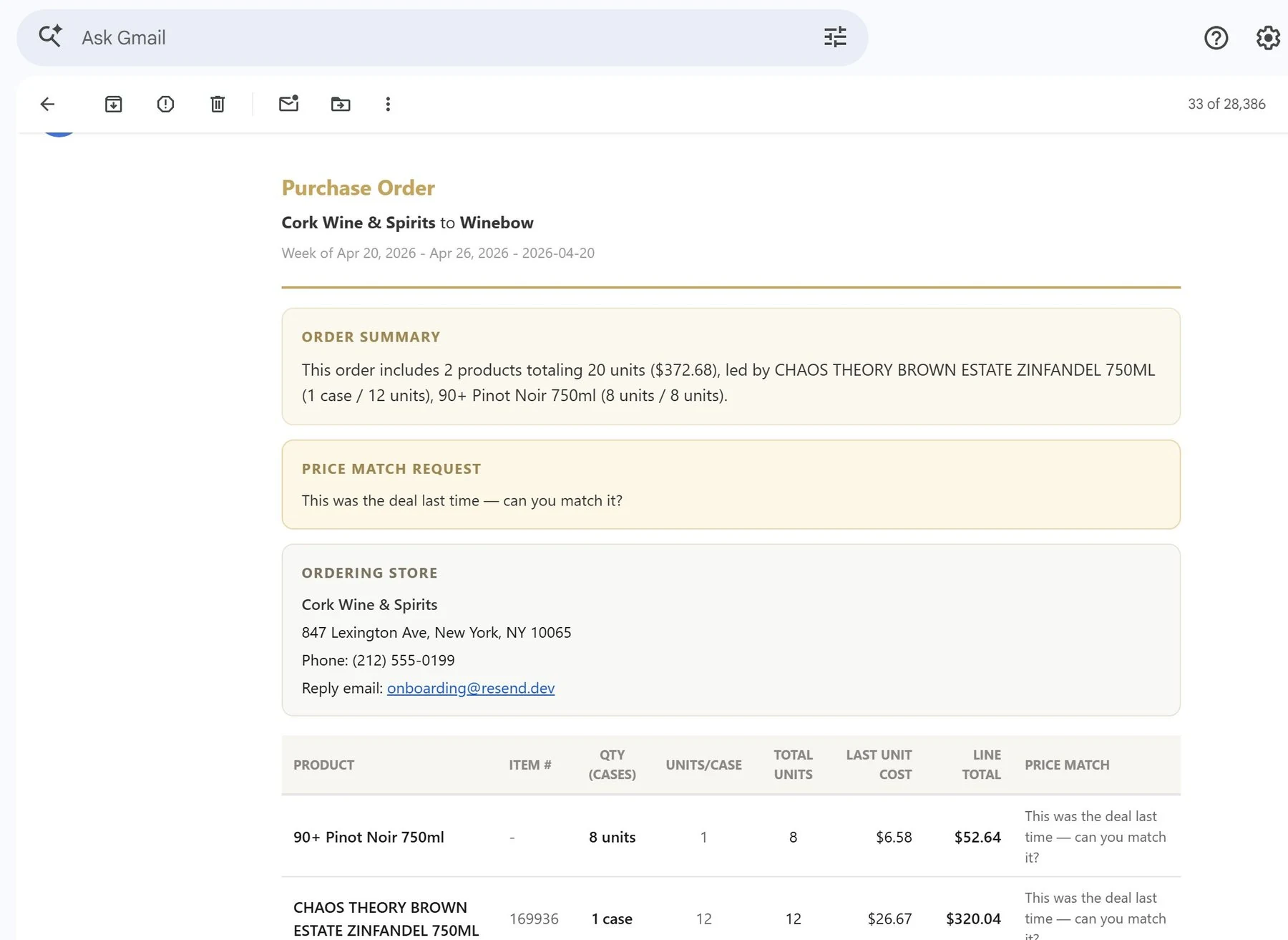
Cork groups every vendor, counts what you actually need from what's selling, and drafts the purchase order with the last price you paid — so a changed deal never sneaks past you.
  • Order enough to stay stocked without burying cash in slow movers
  • Vendor-grouped lists that take a minute to review, not an evening
  • "This was the deal last time — can you match it?" written into the email automatically
Smart Ordering Smart ordering page
Auto-generated PO Auto-generated purchase order email
Invoice Intelligence

Upload. Match. Review. Receive.

A distributor drops 25 cases and a paper invoice. Here's what happens next.

01 / UPLOAD

Snap or drop

PDF or a photo from your phone. Cork spots duplicates on arrival and skips them automatically.

02 / MATCH

Find the right bottle

Cork checks UPCs, item numbers, and product names. If a line looks uncertain, it stays flagged for you.

03 / REVIEW

Side-by-side

Original invoice and matched lines on one screen. Discounts, deposits, and case math broken out cleanly.

04 / RECEIVE

One tap

Stock and costs update together, the PO reconciles itself, and a clean record is kept for the state.

⚡ Unmatched is better than wrong.
Invoice Review

Every line, every discount, every cent.

Cork lays the whole invoice out flat — items, sizes, cases, costs, and discounts. Linked rows are green and locked. Anything unsure stays at the top until you say so.

  • Case discounts and bottle surcharges merged into the right line automatically
  • Per-line discounts kept visible, even when you reopen the invoice later
  • Nothing half-received — the invoice goes in completely, or not at all
Invoice review screen with line items and matches
Meet Scout

A store assistant that knows your shelves.

Your Cork assistant works with your store's products, sales, and orders. Start with a question. Finish with drafts ready for you to review.

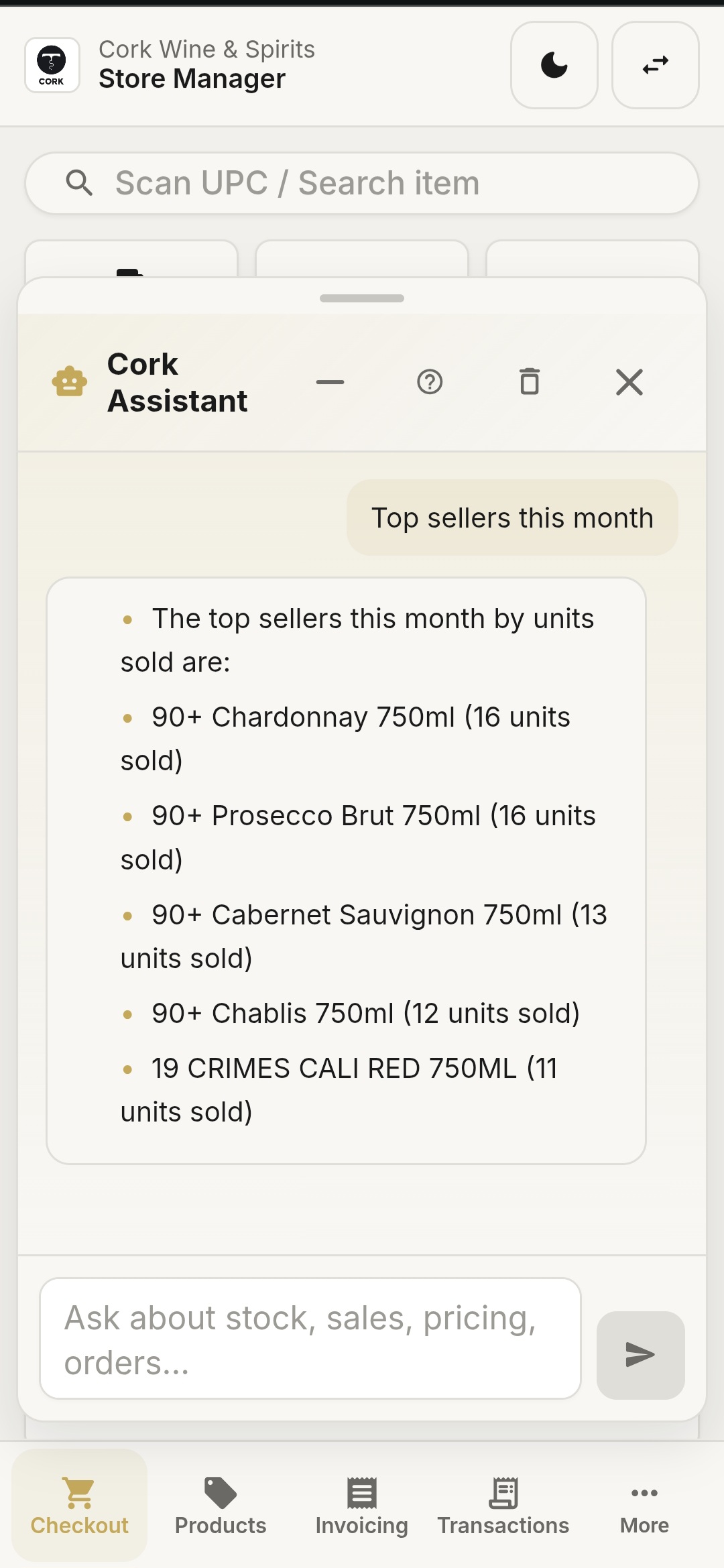
"What are my top sellers this month?"
See what's moving by units and revenue, so the next order matches what customers actually buy.
"What should I reorder before the weekend?"
Cork checks stock on hand, recent sales, and vendor costs — and answers with a list you can act on.
"Is anything costing me more than before?"
Catch price changes and margin drift early enough to make a better buying decision.
"Can someone help right now?"
Yes — 24/7 support means there's always a path when the register or back office needs attention.
app.poscork.com

Illustrative workflow: five low-stock products, two vendor drafts. Nothing is sent to a vendor until you approve.

Scout takes the next step.

Ask it to draft orders for low-stock products. Scout checks your inventory, groups items by vendor, and prepares quantities and estimated costs. Confirm once to create the drafts in Cork; sending them stays a separate decision.

View the inventory assistant screen →
Reports & Analytics

Numbers a store owner can read.

Revenue, transactions, average ticket, and gross margin headline the page. Wine vs. spirits mix, revenue by day, top sellers — one screen, not a maze of submenus.

  • Pick any window — last week, last month, year to date
  • Category mix shown as a simple chart, not a 14-row table
  • Top sellers ranked by bottles sold and dollars made, side by side
Reports and analytics page with KPIs and category breakdown
Mobile

The whole store, in your pocket.

Owners see the numbers from anywhere. Floor staff check stock, suggest bottles, and build order lists — all from the same system.
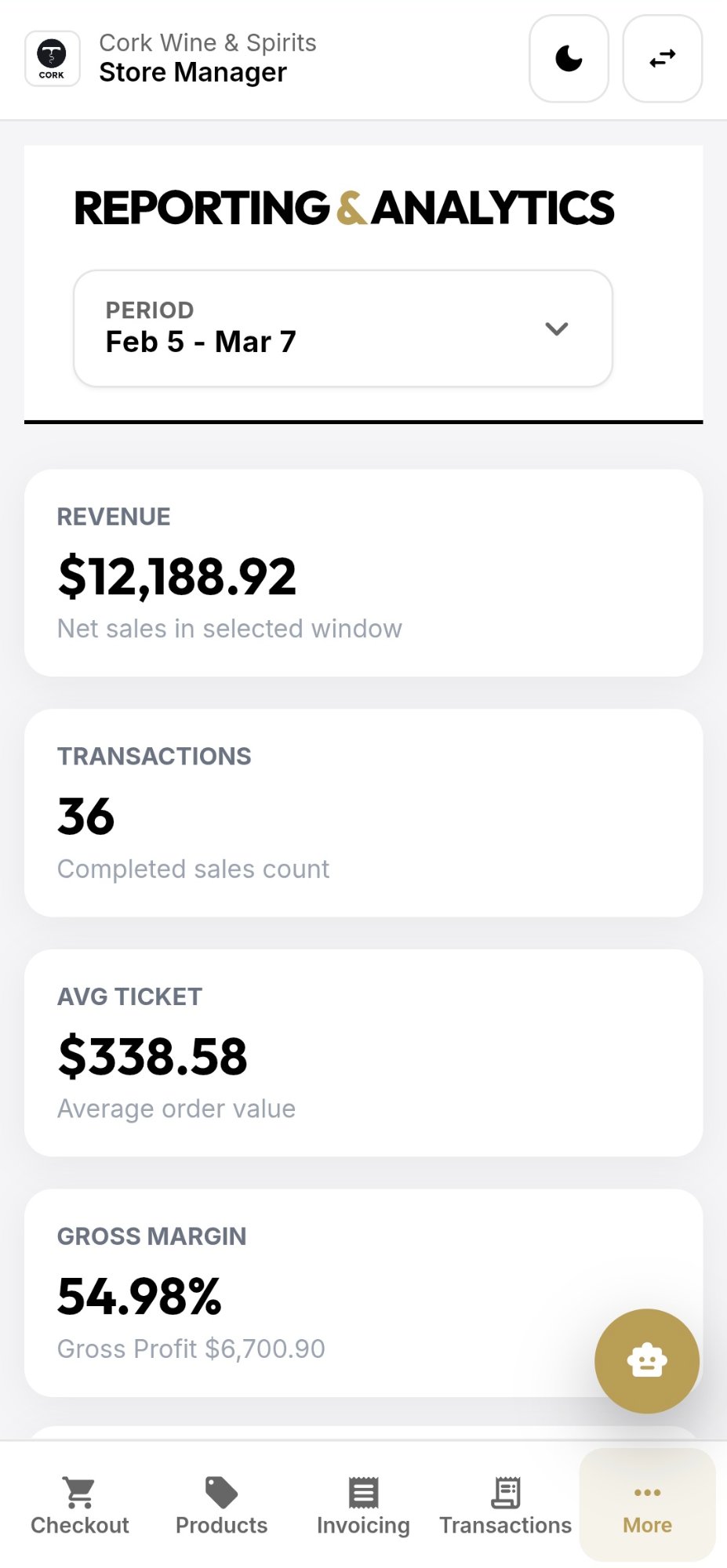
Mobile reports dashboard
Reports & Analytics Revenue, tickets, margin
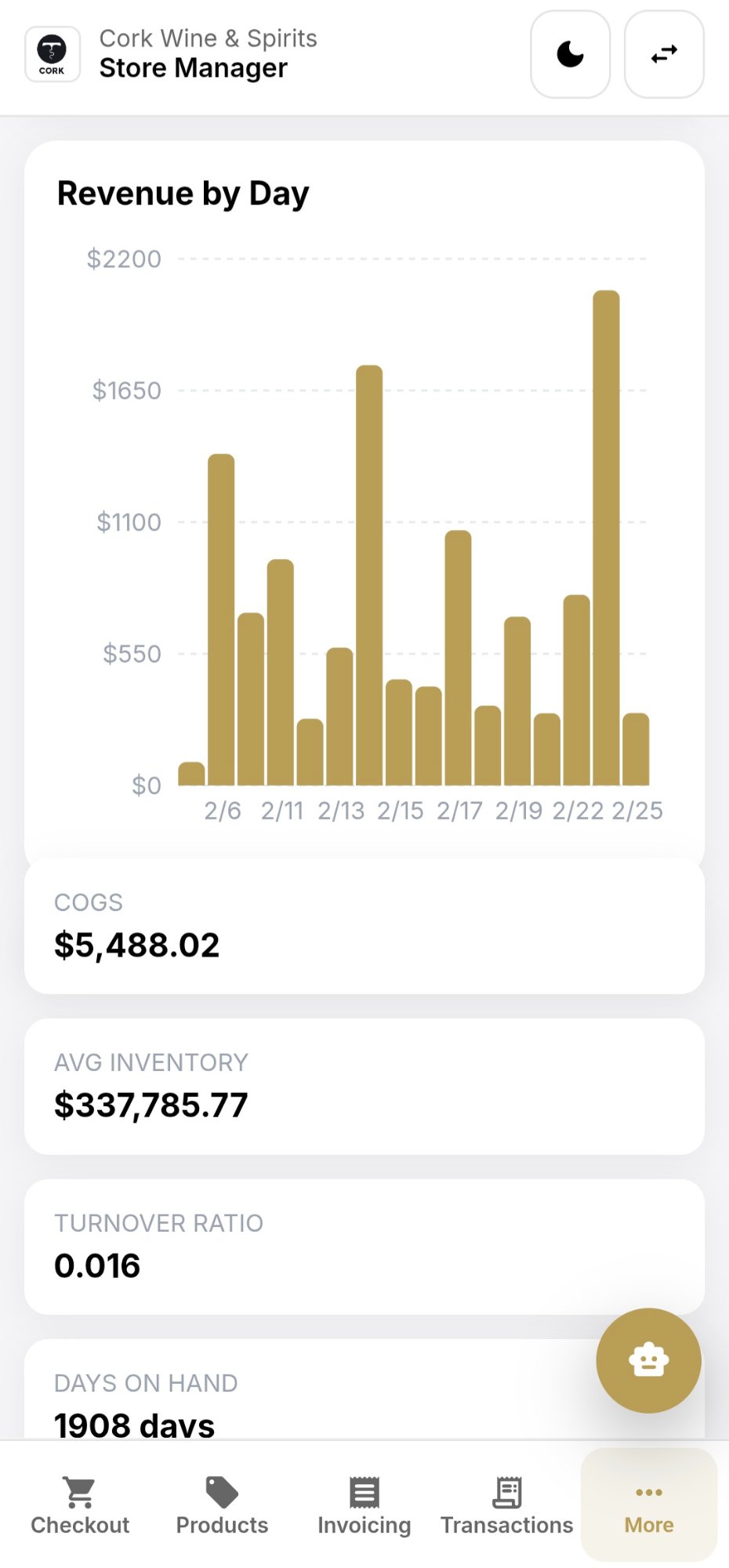
Mobile revenue graph with daily breakdown
Revenue by Day Tap any bar for the number
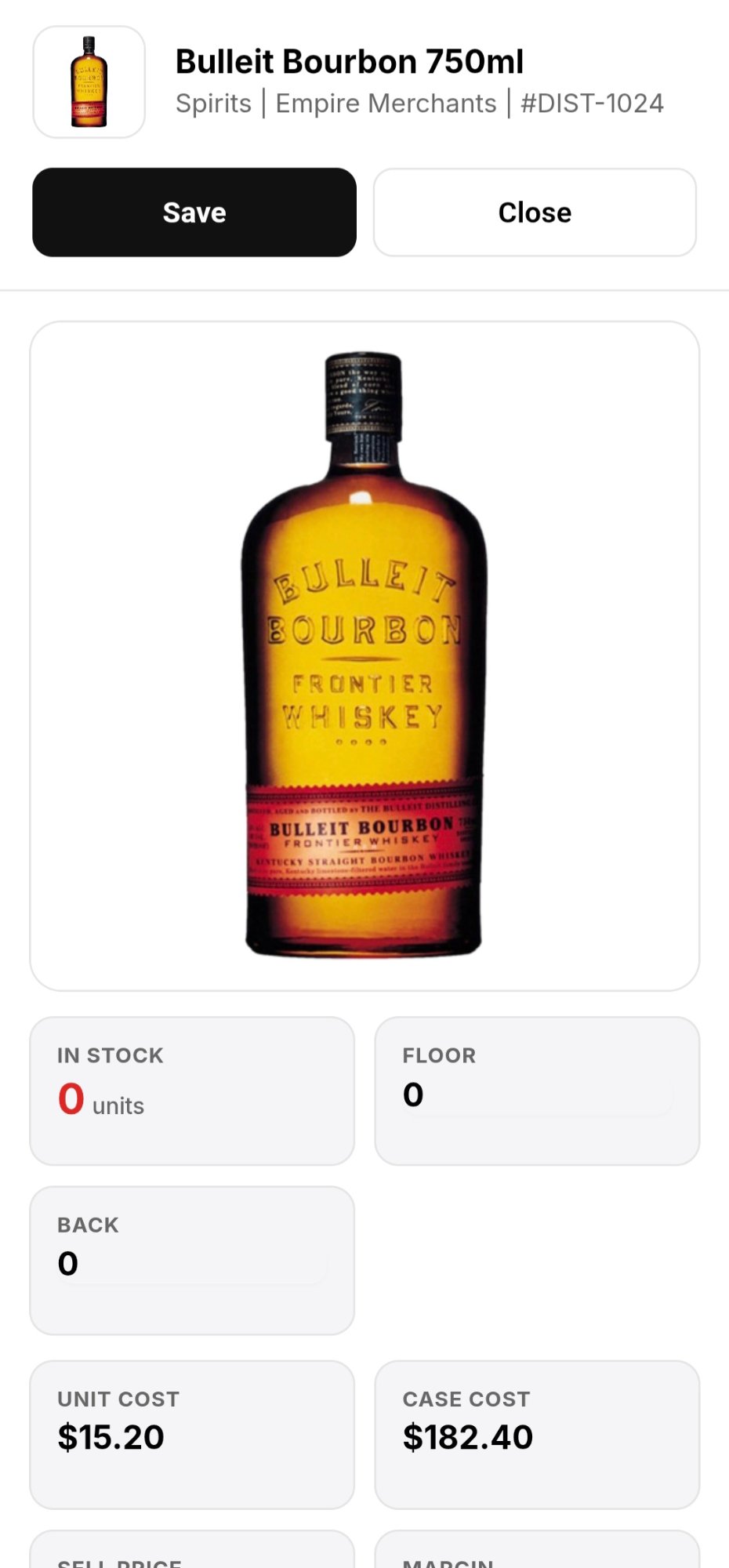
Mobile product detail with bottle photo, stock, and costs
Product Detail Floor, back, unit & case cost
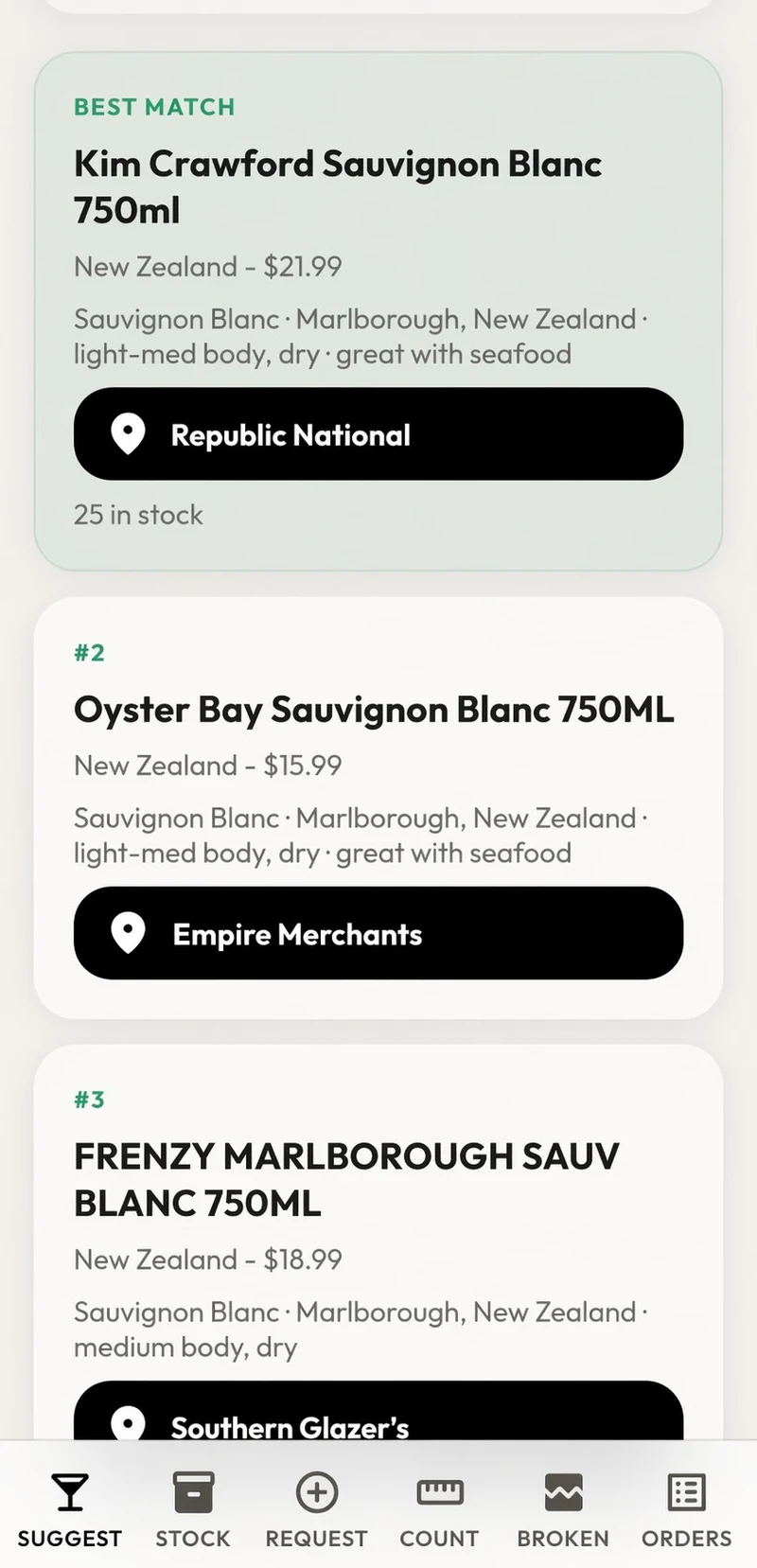
Employee app suggesting in-stock wines by taste and budget
Floor Suggestions Taste, budget, in-stock picks
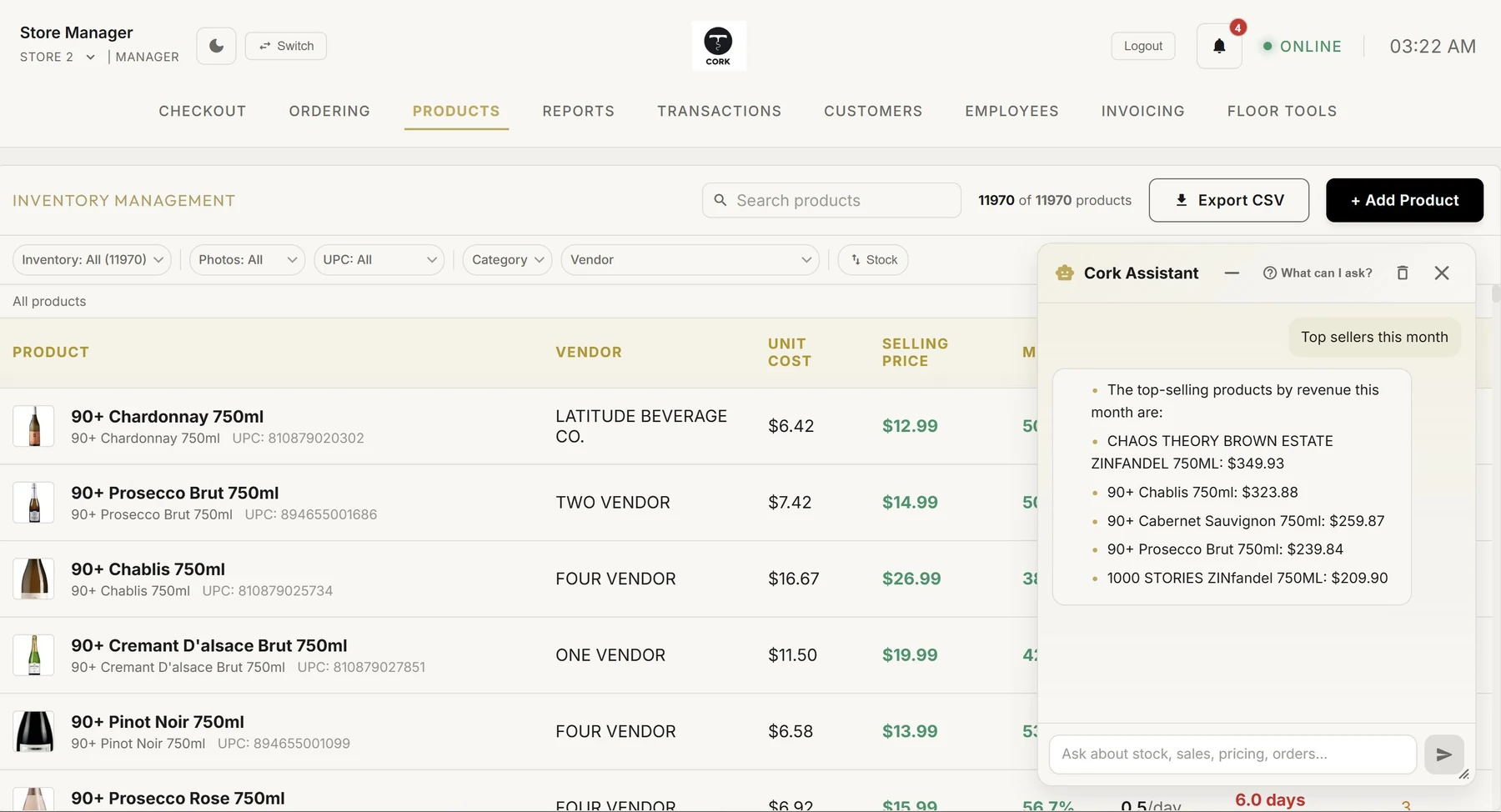
Mobile assistant listing this month's top sellers
Store Assistant Top sellers, stock, orders
24/7 Support

Software with someone who picks up.

Stores don't close at 5pm, and neither do we. When something needs attention — the register, an invoice, an order — a real person from Cork is on it. Any hour, every day.

  • A real person answers During the Friday rush, on Sunday morning — whenever you call.
  • Setup done for you We load your products, connect your vendors, and train your team.
  • Watching, even when you're not Cork keeps an eye on stock, sales, and security so small issues don't become expensive ones.
Principles

Designed for real store days,
not just demos.

The register stays calm when the line gets long. If ten people are waiting, the software shouldn't be the thing that slows you down.
When something on an invoice doesn't look right, it gets flagged — not silently pushed into your inventory. We'd rather leave a line unmatched than match it wrong and corrupt your stock.
Your store's data belongs to your store. Account permissions and store-scoped access checks keep the right records with the right team.
The assistant is practical. Ask what sold, what to reorder, or what changed in cost, and Cork answers from your store's live data.
Built by engineers who've watched store owners spend their evenings keying in invoices line by line. That's the problem we're here to fix.
Pilot pricing

Start with your store.

Contact us for pilot pricing. We'll walk through your setup, the workflows you need, and the cost before you decide.

Discuss your pilot →
  1. 01

    Bring one real workflow

    An invoice, a reorder, or a catalog export. Start with the work you want off your plate.

  2. 02

    Review the setup together

    We check the data, hardware, and team needs with you before planning a switch.

  3. 03

    Know the terms upfront

    Your written proposal covers scope and pricing. Any payment processing fees are explained separately.

The people behind Cork

Less back-office work.
More time for the store.

Cork brings the register, invoices, and ordering into one place because store owners shouldn't have to stitch their day together across spreadsheets and portals.

Talk directly with the Cork team about what isn't working in your store and what a useful first step would look like.

Talk to the team →
Common Questions

Answers, before you ask.

Do I need to buy new hardware?
No. Cork runs in a web browser on the computer, tablet, or phone you already have. If you want new scanners or printers, we help you pick simple ones that work.
How long does setup take?
Most stores are running in days, not months. We load your products, connect your vendors, and walk your team through the register before you switch. You don't do it alone.
What happens to my products and history?
We bring your catalog with you. Your products, prices, and costs are imported so day one on Cork looks like your store — not an empty screen.
Is there someone to call when I need help?
Yes. Cork includes 24/7 support. A real person answers — during the Friday rush, on Sunday morning, whenever you need it.
Is my store data private?
Your store's data belongs to your store. Cork uses store-scoped access controls, and we never sell your data. Read about Security & Data and our privacy policy.
What does a pilot look like?
We set Cork up in your store, run it alongside your current routine, and let the results speak. You see your own invoices, your own orders, and your own numbers in Cork before you commit to anything.

Bring calm to the counter.

A modern operating system for liquor and wine shops that want speed, clarity, and less mess behind the scenes.

Book a Pilot →
Setup done for you · 24/7 support · Your data stays yours